

Outschool's Journey to Boring PostgreSQL Upgrades on AWS RDS
by Abby Flint
Getting Outschool’s database upgrades to a state where they are routine and even boring, has been a journey more exciting than the destination.
This journey will cover some of the hurdles faced along the way, the more interesting surprises RDS had in store for us, and lessons learned the hard way. We’ll call out the most impactful tips we’ve found throughout this process that may be useful in your own database upgrades.
Spring 2024: Building Read Only Mode
This story starts at the beginning of 2024. Outschool had a goal: no downtime database upgrades.
Up to this point, Outschool’s Postgres upgrades involved taking the site down for about an hour. This was not ideal as it meant coordinating with and refunding our teachers for classes that would occur during that hour. Additionally, the size of our system was growing to the point where squeezing the upgrade into an hour window was not feasible.
We needed a less disruptive way to upgrade our database. Which is where Read Only Mode entered the picture. A state where the site is live, but writes are prevented from reaching the database, so we could upgrade without data loss or synchronization issues. Read only mode involves a combination of blocking Graphql mutations, suspending cronjobs, and scaling down background services such as queue workers.
Read only’s goal was a state that allowed our learners to still login, join their classes, and for classes to still be browsable. Meaning teachers no longer had to reschedule or be refunded and classes could continue on as planned. 1 Although other actions like purchasing classes and sending messages are unavailable during the maintenance window.

Winter 2024 into 2025: Using Read Only Mode For A Postgres Upgrade
The next stop on our journey takes us to beginning of 2025, it was time to put this Read Only Mode to work and do a Postgres upgrade. This was partially motivated by AWS rolling out extended support prices for outdated Postgres versions. We were on Postgres 12 at the time, and decided our upgrade target would be Postgres 16.
We needed to determine the best approach for upgrading our primary production database while maintaining zero downtime. We initially evaluated RDS Blue/Green deployments, while it’s designed to reduce downtime, some downtime is always required during the switchover. From our goal, with Read Only Mode to support a true zero-downtime upgrade, even a brief interruption wouldn’t work. Instead, we opted for modifying the method we had used in the past.
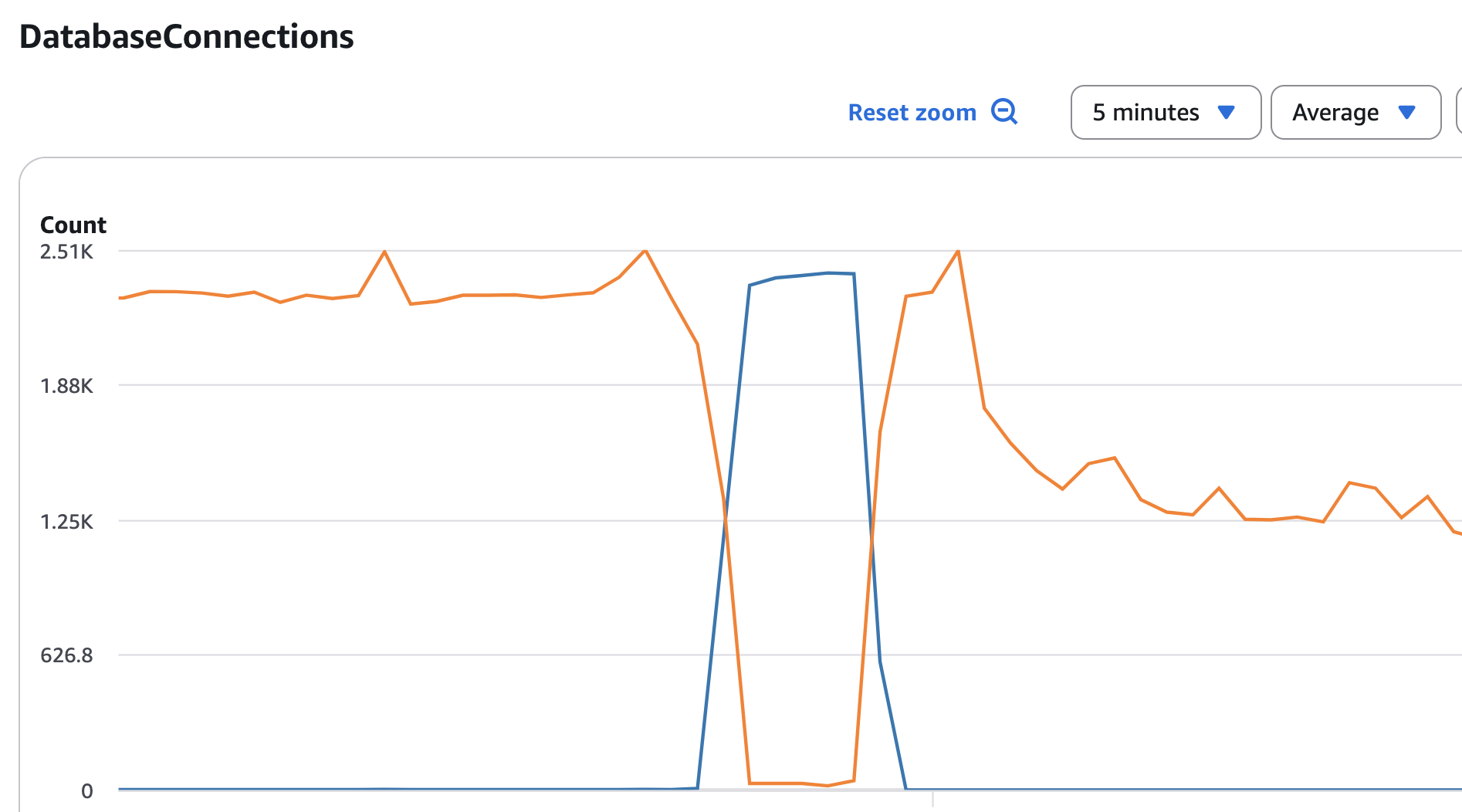
The generalized upgrade flow we used as an alternative looks like:
- Duplicate the primary database as a replica. Warm that replica.
- Enable read only mode to suspend writes to ensure no data sync issues.
- Promote the replica to a standalone database.
- Move all traffic to the replica.
- Upgrade the primary database’s engine version.
- Warm the primary.
- Move traffic back to the primary.
- Disable read only mode and resume normal operations.
Where orange is the primary database and the blue is the replica:
So we got to work preparing for the upgrade. Wrote out a set of shell scripts to execute the steps above, and ran several tests on temporary databases and on the staging database.
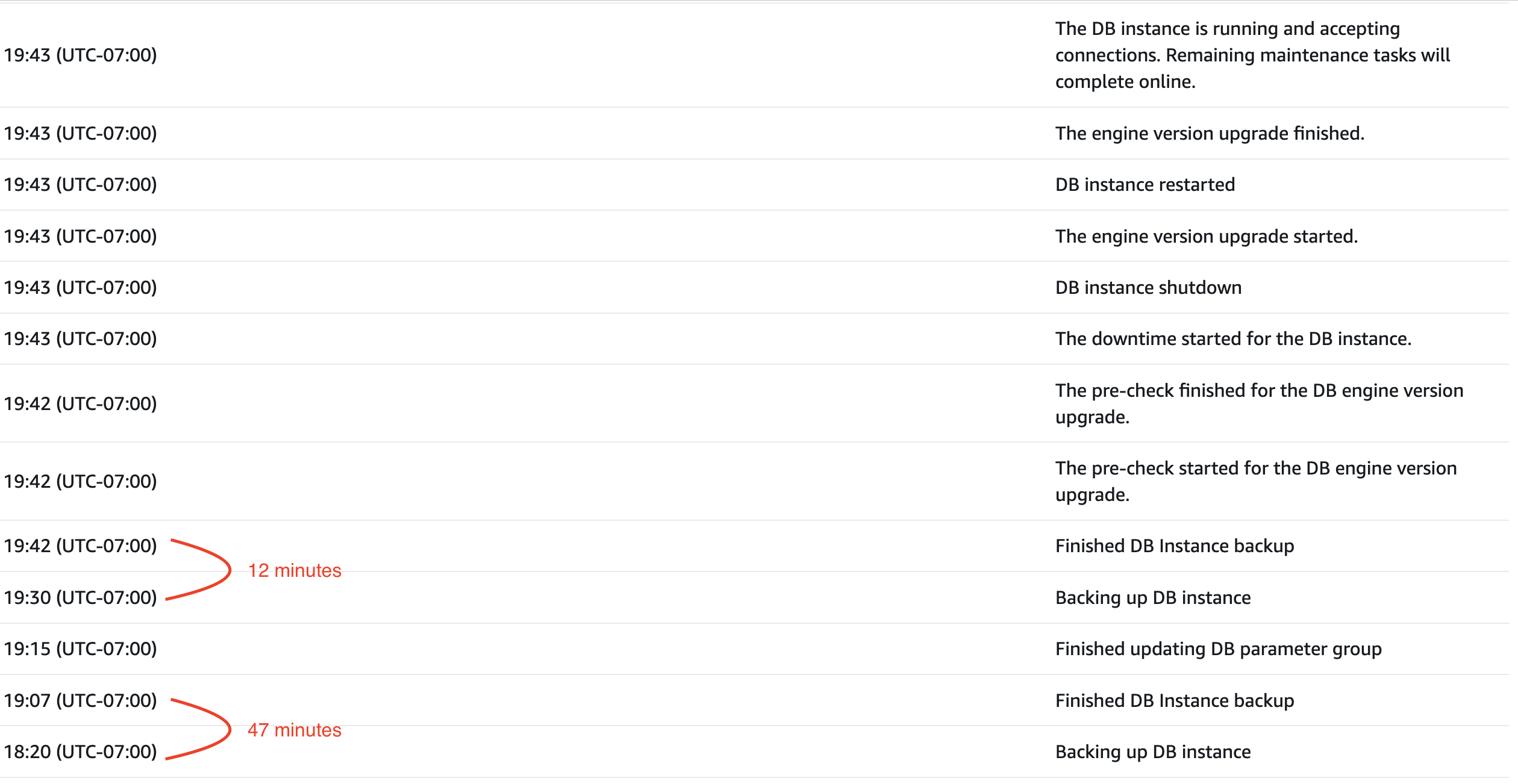
The first noteworthy thing we found during testing, when applying Postgres upgrades RDS automatically takes a pre and post-upgrade snapshot of the database. 2 Since RDS snapshots are incremental, the time to complete can vary depending on the volume of changes since the last snapshot. To minimize the diff of that pre-upgrade snapshot, we found taking a manual snapshot right before the maintenance window greatly reduced the automated pre-upgrade snapshot duration and reduced our total scheduled maintenance window.
As seen in the events timing on an RDS upgrade, that is 35 minutes of scheduled maintenance saved:
Lesson 1: Take a manual snapshot before Postgres upgrades to reduce automated pre-upgrade snapshot duration.
Execution
Once the tests looked promising, we scheduled a maintenance window for production.
As the production upgrade was underway, we saw a hiccup in query latency right when we moved traffic over to the promoted replica. Otherwise things were looking good. However, right as we were in the middle of the step 5: the version upgrade, the upgrade failed. There was no immediate error, however after digging through logs we found:
ERROR: could not load library "/rdsdbbin_new/postgres-16.3.R3/lib/aws_s3.so": libpsl.so.5: cannot open shared object file: No such file or directory
An underlying operating system dependency was not compatible with the target Postgres version.
We noticed there was a pending operating system upgrade for the database, so quickly applied that. The upgrade then successfully made it to Postgres 16! However, the automatic post-upgrade snapshot was moving incredibly slowly. We had exhausted our allocated schedule maintenance window, and made the decision to fall back to our replica and leave the traffic where it was.
After falling back to the replica, we discovered a few writes made it in during our read only mode, but we were able to sync the data between the databases. We knew we needed a way to ensure zero data inconsistencies between the replica and primary during maintenance.
A few weeks later, after ensuring everything was stable on the new database, we gave the Postgres 16 upgrade another go; this time the primary database had a fresh operating system since it was the recently created replica from the initial upgrade, so we saw no incompatibility during the upgrade step. A success!
The only other thing to call out from our second attempt, after the engine version upgrade, and even after running ANALYZE like AWS recommends to warm the database, we saw elevated latency for the initial queries when we moved traffic back. 3
We had some questions to address out of this upgrade?
- What caused the database snapshot to take so long?
- How can we ensure the operating system is compatible with the Postgres version?
- How can we make sure there are zero writes to the database?
- How can we make sure there are no warming problems?
Fall 2025: From the top!
An email with the subject line, [Action Required] Amazon RDS for PostgreSQL is deprecating minor version on October 31, 2025 found us. We had about one month to upgrade before the October 1 deadline of not being able to create any new instances on the deprecated minor version, which is required to accurately test the upgrade.
We decided since updates to the scripts were required anyway, while we were at it to port the shell scripts over to TypeScript. With the motivation to catch errors earlier than runtime and improve configuration validation. Plus the last upgrade involved many manual steps that would be nice to automate eventually, and TypeScript would make those automations more pleasant to implement.
Then came time to understand our questions from last time. Each took research and experimentation, especially to validate details not captured in AWS documentation.
Understanding: What caused the database snapshot to take so long?
In the future, we would like to avoid the scenario of a long snapshot eating up our schedule maintenance window.
To start, we already knew RDS snapshots were incremental. Further, they are incremental per availability zone, and we have a multi-az database. During AWS operating system maintenance, the primary available zone actually swaps, and it fails over to the secondary zone. 4 Therefore, the next snapshot is a full copy, not incremental, taking significantly longer to complete.
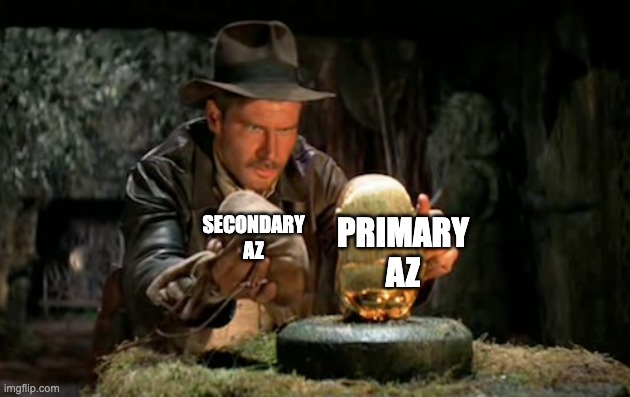
Now since aws commands don’t have an option for targeting a specific availability zone when taking a snapshot, we couldn’t adopt a similar strategy as with the pre-upgrade snapshot.
Additionally, we validated with testing, as it’s not well documented, operating system maintenance does not automatically take a snapshot before or after applying the patch like it does during engine version upgrades. Therefore, this problem of snapshots for the multi-az instances are eliminated if engine version upgrades are always applied separately from operating system maintenance.
Lesson 2: If you have a multi-az instance, don’t perform operating system maintenance during the same maintenance window as Postgres version upgrades to avoid very slow full snapshots.
Understanding: How can we ensure the operating system is compatible with the Postgres version?
You cannot reproduce or catch operating system incompatibility on a new test database, as a new RDS database is always created with the latest operating system patch. Additionally, RDS exposes virtually no details about what operating system your instance is currently using.
We contacted AWS support looking for recommendations for how to test, they said there is no direct way to replicate or validate OS maintenance in a non-production environment before applying it to production. Plus, they confirmed details about the OS are not directly visible.
Working around these limitations, we did come up with one test utilizing an existing follower database. By duplicating an existing replica and promoting it to a standalone instance to run the Postgres upgrade on. A successful upgrade on that instance verifies the compatibility of the Postgres version on an existing operating system. This only works under the condition your replica and primary have operating systems approximately the same age, either created at or both had an operating system patch at the same time.
We now run this test regularly before engine version upgrades.
Understanding: How can we make sure there are zero writes to the database?
We made an internal system fix to prevent the source of the writes, but we wanted insurance at the database level that all writes would be blocked. We found default_transaction_read_only, to force all connections to disallow write operations. 5
This is the same parameter setting used for RDS replicas to be read only. It’s a dynamic RDS parameter group setting, so it is simple to toggle during our maintenance window without requiring a database reboot.
Lesson 3: Set default_transaction_read_only during maintenance to block all writes at the database level.
Understanding: How can we make sure there are no latency/warming problems?
This question is important as latency during the upgrade process negatively impacts our users. To fully understand what “warm” for the database means, let’s first understand the causes of the latency.
There are three primary causes that you may run into during a database upgrade
- Database cache wiped on reboot. Disk reads are slow, and it takes time to repopulate this cache.
- Following database instance creation. Behind the scenes when creating an RDS instance, a snapshot is taken. This snapshot is stored in s3 and lazy loaded over into disk. 2 Notably this can be mitigated by reading as many of the data block as possible to call them over.
pg_statistictable is not copied over during major version upgrades. The query planner cannot choose the most efficient query plan which leads to a significant performance hit.
At this point in the journey, there were three ways we experimented with to warm the database.
The first strategy, using ANALYZE, which populates the entries in the query planner catalog. This is the primary solution for the pg_statistics table latency. This is required for major version upgrades earlier than Postgres 18. This command can also help to call over data on cache wipe or for lazy loading, however it is slow and what ends up in cache is not controllable.
The second method, replication of all live SELECT queries to the target database. This helps ensure there is reasonably relevant data in cache as it’s real queries being loaded. It can be resource intensive on the server as all reads are duplicated. This helps with cache wipe and on database instance creation.
The final way, calling pg_prewarm on important tables. This loads data into buffer caches, so it helps with cache wipe latency as well after database instance creation. One downside is it can be slow, especially on a fresh database instance. It does pull in relevant data when run over a subset of important tables. Often, if run on its own, can still see latency afterwords, especially for any queries touching tables not called in.
We will come back to warming again a bit further along, so no important lesson to callout yet beyond understanding the types of latency seen during database maintenance and some options to mitigate.
Execution
After all our questions were resolved, and we were happy with the new TypeScript scripts, we kicked off another production run, this time a minor version upgrade. It completed successfully!
The only hiccup we saw was on replicas DBUpgradeDependencyFailureFault when trying to upgrade our primary database. After some research, we found this was because during major versions AWS automatically upgrades the replicas, but for minor version upgrades you must manually upgrade them first. This was our first minor version upgrade on production. We never saw this in our testing because our staging database for example, does not have replicas so we were surprised in prod.
To reduce surprises specific to configuration again in the future, we updated our testing to be as close to production config as possible. Changes like always making the test database multi-az and having at least one replica. There’s a lot of factors out of control or hard to replicate during tests, for example production traffic patterns, so to minimize factors in your control helps tests be more comprehensive.
Lesson 4: Staging will never be production. Mitigate the configuration differences where possible to make production upgrades more predictable.
After that time crunch we had a few more follow-up items:
- Now that we have TypeScript running the show, what more can we automate? What manual overhead can we reduce?
- Can warming be more efficient?
- Can we shave any more time off the scheduled maintenance window?
Winter 2025 into 2026: Two is Better than One
We next wanted to put into action this separation of operating system maintenance from engine version upgrades, and plan for two scheduled maintenance windows.
Plus we were already approaching the extended support deadline. Further, RDS operating system maintenance is often optional, however on occasion can be required with a deadline, and we wanted to be prepared for that scenario.
Understanding: What more can we automate?
We expanded the scripts to handle as many bits and pieces of the process as possible. We automated several previously manual steps such as freezing the merge train, notifying cross-functional teams in Slack, and suspending on-call alerts to avoid noise during the maintenance window.
The biggest impact of this change was a more consistent upgrade process that required less coordination with the team. This allowed us to focus more of our attention on monitoring the upgrade itself. We found the less non-critical details we had to hold in ours head, the better we could focus on the parts that really matter.
Lesson 5: Automate every manual step you can. The fewer variables the better.
Understanding: Can warming be more efficient?
We saw a lot of success for users not experiencing latency using the previously mentioned methods, however they were all time-consuming, which of course we prefer to optimize for a shorter maintenance window. We decided to do some research on how we could optimize this.
The discovery of pg_prewarm.autoprewarm was a game changer in that regard. This command we had been using had a configuration option we had missed in the past, by adding it to shared_preload_libraries it automatically runs a background worker that takes snapshots of the cache and restores the latest snapshot after reboot. 6 If there was ever a library we wished were included by default, it’d be this one. However, enabling it requires a database reboot, so we took advantage of our double maintenance windows to apply it.
During the second database upgrade we were very pleasantly surprised by zero latency for traffic moving back after the upgrade. No disk queue depth spike or anything. This one setting dropped our maintenance window down by 30 minutes.
For example, without this setting we’d typically expect a steep increase in disk queue depth from manually warming ourselves before moving connections back. As seen here, there is no effect on reads going to disk after connections return to the upgraded database:

Lesson 6: Enable pg_prewarm.autoprewarm to solve your warming issues from cache wipes during reboots in upgrades.
Do note, that ANALYZE still needs to be run for the query planner in most Postgres versions on major version upgrades. And of course, one of the three warming methods presented previously is still needed upon creating a new replica as there is no existing cache to restore from. However, this entirely reduced the need to warm the upgraded database for minor version upgrades and saves significant time in a limited maintenance window.
Understanding: Can we shave any more time off the scheduled maintenance window?
Of the stages within our control, excluding RDS managed steps we can’t optimize, one of the longest lulls was waiting for services to restart with environment variable changes used to handle stages of the upgrade.
For context, we had reduced the time to restart on services with several changes. Such as going from restarting all services to only a subset of foreground services required for the upgrade. Other migrations happening on the side like AWS ECS to Kubernetes also had very positive effects on restart timing.
Once we were running these upgrades against kubernetes deployments, we were able to take advantage of overprovisioning to speed things up even further. Our clusters maintain a set of low priority pods to reserve extra node capacity so that application pods may evict them as needed. Since upgrades involve turning over so many pods, we scaled up the overprovisioning in the scripts to handle the higher volume of restarts.
We left this upgrade with no pending questions.
Fall 2026: Where we are today
This is where the story pauses for now, database upgrades are predictable. We very recently completed a successful upgrade with no investigation, surprises, or mysteries to solve.
There will no doubt be additional chapters to Outschool’s database upgrade story as Postgres and AWS roll out more changes with time, but we have a solid foundation to build on.
Lessons
Overall, we found the process of iterative improvement crucial for getting this process to where it is at today. Narrowing the scope for what pieces of this large process to knock out at time with real production upgrades along the way to verify we are the right path helped a lot.
And as a recap, the biggest game changers for us:
- Take a manual snapshot before Postgres upgrades to reduce automated pre-upgrade snapshot duration.
- If you have a multi-az instance, don’t perform operating system maintenance during the same maintenance window as Postgres version upgrades to avoid very slow full snapshots.
- Set
default_transaction_read_onlyduring maintenance to block all writes at the database level. - Staging will never be production. Mitigate the configuration differences where possible to make production upgrades more predictable.
- Automate every manual step you can. The fewer variables the better.
- Enable
pg_prewarm.autoprewarmto solve your warming issues from cache wipes during reboots in upgrades.
-
https://support.outschool.com/en/articles/9201176-using-the-outschool-website-during-scheduled-maintenance. ↩︎
-
https://aws.amazon.com/blogs/database/amazon-rds-snapshot-restore-and-recovery-demystified/ ↩︎ ↩︎
-
https://docs.aws.amazon.com/AmazonRDS/latest/UserGuide/USER_UpgradeDBInstance.PostgreSQL.MajorVersion.Process.html ↩︎
-
https://docs.aws.amazon.com/AmazonRDS/latest/UserGuide/USER_UpgradeDBInstance.Maintenance.html#USER_UpgradeDBInstance.Maintenance.Multi-AZ ↩︎
About the Author

Abby Flint
Software Engineer on the Infrastructure pod at Outschool.